01-사진수집
1. 카카오 이미지 검색 OpenAPI를 활용한 사진 수집
Section titled “1. 카카오 이미지 검색 OpenAPI를 활용한 사진 수집”1.1. 개발 환경 설정
Section titled “1.1. 개발 환경 설정”- 카카오 개발자 사이트에 가입한다
- 애플리케이션(이하 앱)을 만들어 앱 키를 발급
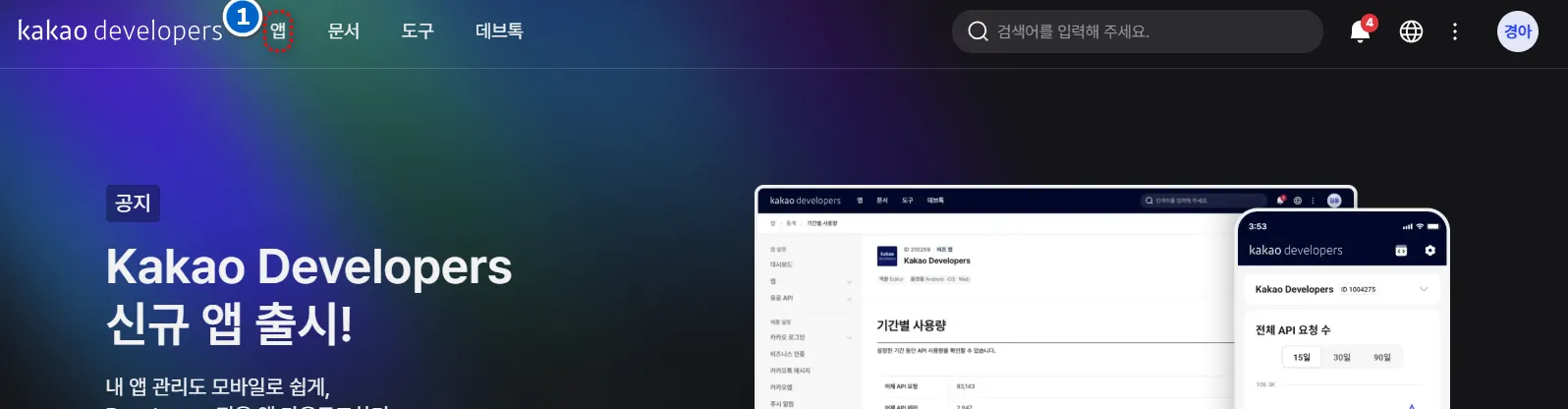
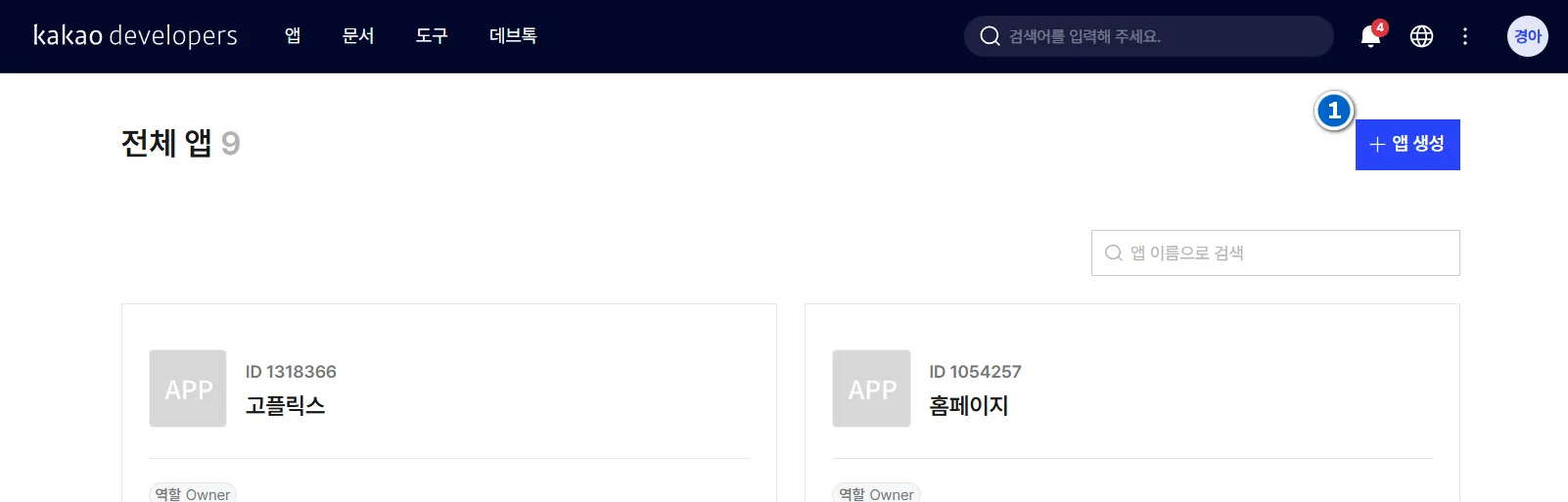
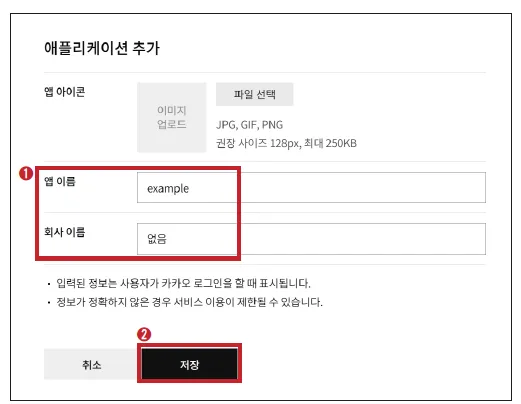
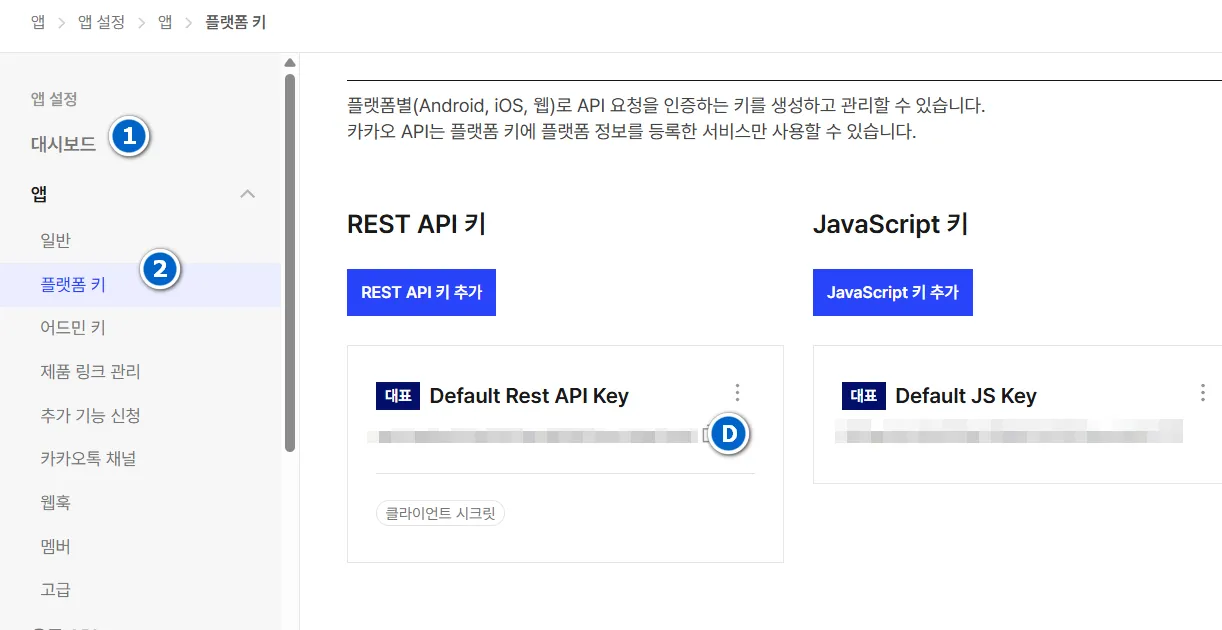
- RESTAPI키 복사하여 텍스트 파일로 저장
1.2. 기본 문법 익히기
Section titled “1.2. 기본 문법 익히기”1.2.1. 파일읽고쓰기
Section titled “1.2.1. 파일읽고쓰기”data='hello'with open('text.txt', 'w') as fp: fp.write(data)with open('text.txt','r') as fp: print("result") print(fp.read())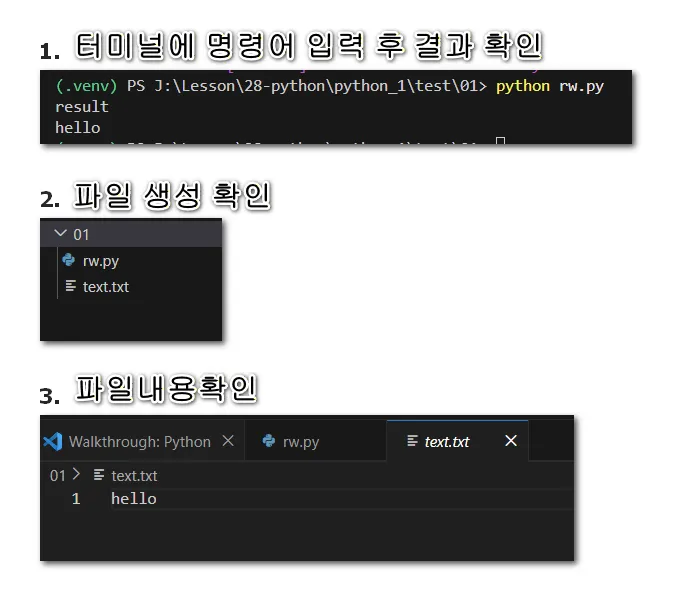
| 줄 | 코드 | 설명 |
|---|---|---|
| 1 | data='hello' | 변수 data에 'hello' 저장 |
| 2-3 | with open('text.txt', 'w') as fp: | 파일을 쓰기 모드로 열기 |
| 3 | fp.write(data) | 파일에 'hello' 쓰기 |
| 4-6 | with open('text.txt','r') as fp: | 파일을 읽기 모드로 열기 |
| 5 | print("result") | 화면에 result 출력 |
| 6 | print(fp.read()) | 파일 내용을 읽어서 출력 |
1.2.2. 웹의 이미지 저장하기
Section titled “1.2.2. 웹의 이미지 저장하기”아래의 경로를 복사하여 웹브라우저 주소창에 붙여 넣는다.
https://qwerew.cafe24.com/images/1.jpg import requests
# 이미지가 있는 url 주소 url = "https://qwerew.cafe24.com/images/1.jpg"
# 브라우저처럼 보이게 하기 위한 헤더 headers = { 'User-Agent': 'Mozilla/5.0 (Windows NT 10.0; Win64; x64) AppleWebKit/537.36' }
# 해당 url로 서버에게 요청 img_response = requests.get(url, headers=headers)
# 응답 상태 확인 print(f"응답 코드: {img_response.status_code}")
# 요청에 성공했다면, if img_response.status_code == 200: print("========= [이미지 저장] =========") with open("test.jpg", "wb") as fp: fp.write(img_response.content) print("저장 완료!") else: print(f"오류 발생: {img_response.status_code}")1.3. 완성코드
Section titled “1.3. 완성코드”import requestsimport json# 이미지가 있는 image_url을 통해 file_name 파일로 저장하는 함수def save_image(image_url, file_name): img_response = requests.get(image_url) # 요청에 성공했다면, if img_response.status_code == 200: # 파일 저장 with open(file_name, "wb") as fp: fp.write(img_response.content)# 이미지 검색url = "https://dapi.kakao.com/v2/search/image"headers = { "Authorization": "KakaoAK <REST_API 앱 키를 입력하세요>"}data = { "query": "펭수"}
# 이미지 검색 요청response = requests.post(url, headers=headers, data=data)# 요청에 실패했다면,if response.status_code != 200: print("error! because ", response.json())else: # 성공했다면, count = 0 for image_info in response.json()['documents']: print(f"[{count}th] image_url =", image_info['image_url']) # 저장될 이미지 파일명 설정 count = count + 1 file_name = "test_%d.jpg" % (count) # 이미지 저장 save_image(image_info['image_url'], file_name)이미지 저장 갯수 지정
import requestsimport json# 이미지가 있는 image_url을 통해 file_name 파일로 저장하는 함수def save_image(image_url, file_name):    img_response = requests.get(image_url)    # 요청에 성공했다면,    if img_response.status_code == 200:        # 파일 저장        with open(file_name, "wb") as fp:            fp.write(img_response.content)# 이미지 검색url = "https://dapi.kakao.com/v2/search/image"headers = {    "Authorization": "KakaoAK RESTAPI키"}data = {    "query": "펭수"}
# 이미지 검색 요청response = requests.post(url, headers=headers, data=data)# 요청에 실패했다면,if response.status_code != 200: print("error! because ", response.json())else: # 성공했다면, save_n = 5 # 저장할 이미지 갯수 count = 0 for image_info in response.json()['documents']: print(f"[{count}th] image_url =", image_info['image_url']) # 저장될 이미지 파일명 설정 count = count + 1 file_name = "test_%d.jpg" % (count) # 이미지 저장 save_image(image_info['image_url'], file_name) # 지정한 갯수만큼 저장하면 중단 if count >= save_n: breakAPI(Application Programming Interface)는 서로 다른 프로그램이나 서비스 간에 데이터를 주고받을 수 있도록 정의된 규칙이다.
개발자는 API를 통해 외부 서비스의 기능을 자신의 애플리케이션에 통합할 수 있다.
예를 들어, 날씨 정보, 지도 데이터, 결제 시스템 등을 API를 통해 활용할 수 있다.
API를 사용하려면 요청(request)과 응답(response)의 구조를 이해해야 한다.
요청(request)은 어디로, 어떻게 요청해야 하는지 기술되어 있고, 응답(response)은 어떤 결과가 전달되는지 기술되어 있다.
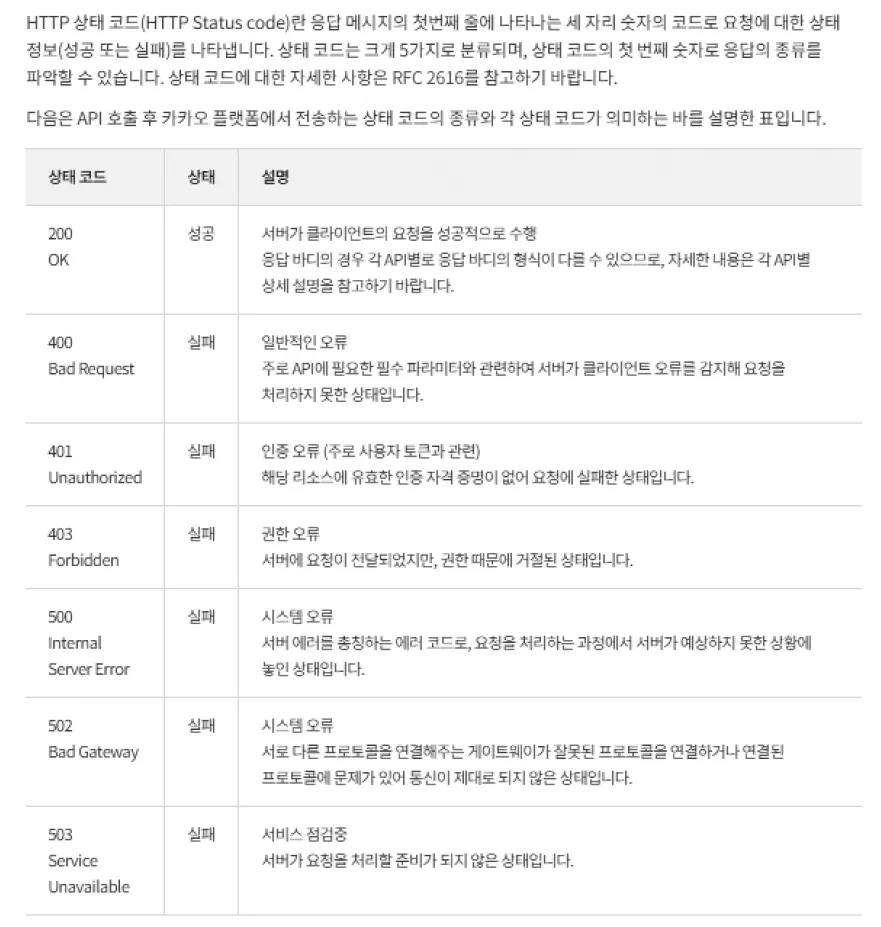
요청을 한다고 해서 항상 성공할 수는 없다. 다양한 이유로 오류가 날 수 있다. 응답 코드 중 요청에 대한 상태를 나타내는 오류는 두 가지가 있다.
첫 번째가 HTTP의 상태 코드(Status Code)이며, 두 번째는 response 값에 오류 정보를 담은 오류 코드(Error Code)이다.
HTTP 상태 코드의 경우 HTTP 프로토콜을 사용하면 공통으로 적용되는 응답 코드이며, 오류 코드는 OpenAPI를 제공하는 제공사마다 다르다.
아래는 공통적인 HTTP의 상태 코드 이미지이다