7. 테이블요소
`table`/`tr`/`td` 기본 구조, `thead`/`tbody`/`tfoot` 구조화, `colgroup`, 셀병합(`rowspan`·`colspan`), 표 접근성을 다룬다.
Info: 🗃️ 예제파일 :
1. table, tr, td 요소로 테이블 삽입하기
Info: 👁️🗨️
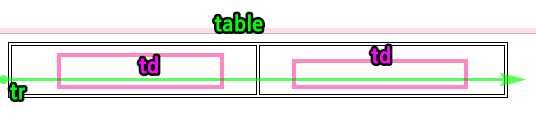
table
표를 만들때 사용하는 태그
- 문법
table>tr>td
<table>

  <tr>

    <td></td>

    <td></td>
  </tr>
</table>
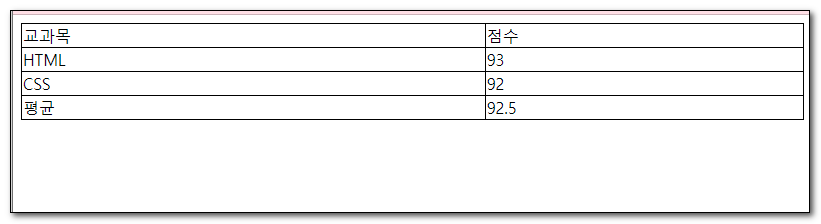
ex1-19.html
<!DOCTYPE html>
<html lang="ko">
<head>
    <meta charset="UTF-8">
    <title>표</title>
    <style>
        table {
            width: 100%;
            border-collapse: collapse;
        }
        td {
            border: 1px solid #000;
        }
    </style>
</head>
<body>
    <table>
        <tr>
            <td>교과목</td>
            <td>점수</td>
        </tr>
        <tr>
            <td>HTML</td>
            <td>93</td>
        </tr>
        <tr>
            <td>CSS</td>
            <td>92</td>
        </tr>
        <tr>
            <td>평균</td>
            <td>92.5</td>
        </tr>
    </table>
</body>
</html>
2. 테이블 구조화 하기
Info: 👁️🗨️ 테이블을 구조적으로 작성하는 요소
- 작성하지 않아도 웹브라우저에서 교정해줍니다.
- thead와 tfoot의 마크업 순서가 바뀌어도 화면출력 위치는 변하지 않습니다.
| thead | 테이블의 헤더영역을 의미하는 요소 | td 가 올수없음 th 사용 | | --- | --- | --- | | tbody | 테이블의 바디영역을 의미하는 요소 | | | tfoot | 테이블의 푸터영역을 의미하는 요소 | |
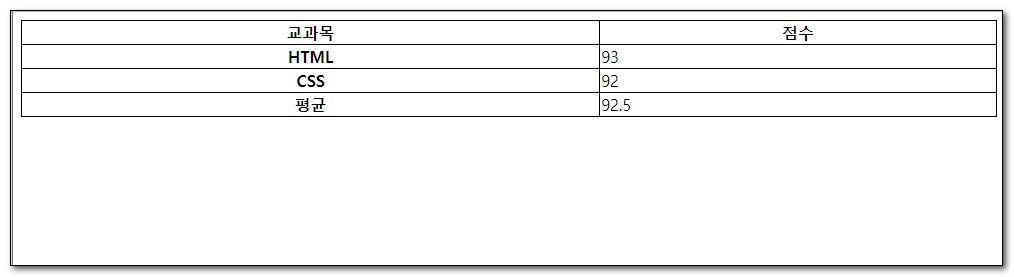
ex1-20.html
<!DOCTYPE html>
<html lang="ko">
<head>
    <meta charset="UTF-8">
    <title>표</title>
    <style>
        table{
            width: 100%;
            border-collapse: collapse;
        }
        td,th{
            border: 1px solid #000;
        }
    </style>
</head>
<body>
    <table>
       <thead>
             <tr>
                <th>교과목</th>
                <th>점수</th>
            </tr>
        </thead>
        <tbody>
            <tr>
                <th>HTML</th>
                <td>93</td>
            </tr>
            <tr>
                <th>CSS</th>
                <td>92</td>
            </tr>
        </tbody>
        <tfoot>
            <tr>
                <th>평균</th>
                <td>92.5</td>
            </tr>
        </tfoot>
    </table>
</body>
</html>
3. colgroup
Info: 👁️🗨️ span 속성으로 영역확장
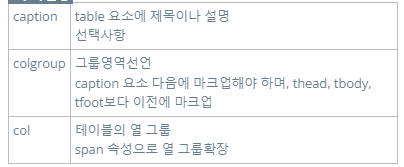

ex1-21.html
<!DOCTYPE html>
<html lang="ko">
<head>
    <meta charset="UTF-8">
    <title>표</title>
    <style>
        table{
            width: 100%;
            border-collapse: collapse;
        }
        td,th{
            border: 1px solid #000;
        }
        .c1{
            background: #ff0; /*노락색*/
        }
        .c2{
            background: #0ff; /*하늘색*/
        }
    </style>
</head>
<body>
    <table>
				<caption>망고의 기말고사 점수</caption>
        <colgroup>
            <col class="c1">
            <col class="c2">
        </colgroup>
        <thead>
            <tr>
                <th>교과목</th>
                <th>점수</th>
            </tr>
        </thead>
        <tbody>
            <tr>
                <th>HTML</th>
                <td>93</td>
            </tr>
            <tr>
                <th>CSS</th>
                <td>92</td>
            </tr>
        </tbody>
        <tfoot>
            <tr>
                <th>평균</th>
                <td>92.5</td>
            </tr>
        </tfoot>
    </table>
</body>
</html>
4. 셀병합하기
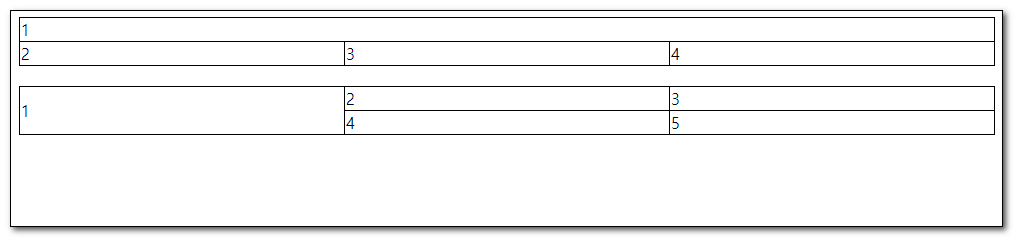
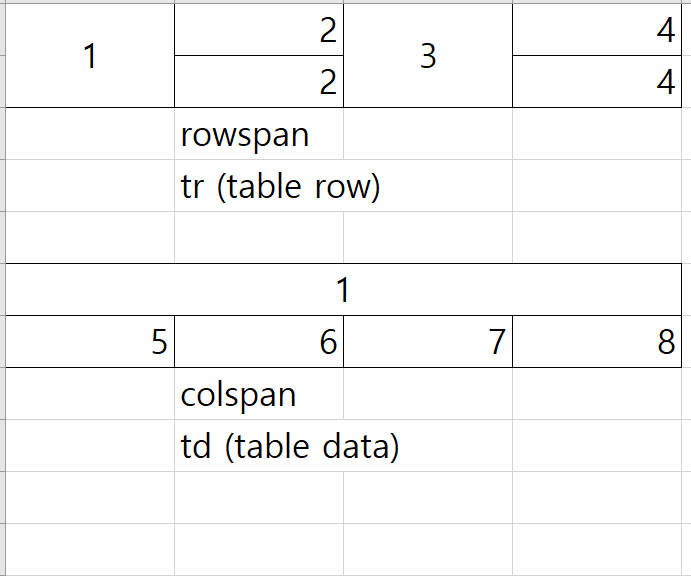
| 속성 | 설명 |
|---|---|
| colspan | 열(가로)병합 |
| rowspan | 행(세로)병합 |
ex1-22.html
<!DOCTYPE html>
<html lang="ko">
<head>
    <meta charset="UTF-8">
    <title>셀 합치기</title>
    <style>
        table{
            width: 100%;
            border-collapse: collapse;
            margin-bottom: 20px;
        }
        td{
            border: 1px solid #000;
        }
    </style>
</head>
<body>
    <table>
        <tr>
            <td colspan="3">1</td>
        </tr>
        <tr>
            <td>2</td>
            <td>3</td>
            <td>4</td>
        </tr>
    </table>
    <table>
        <tr>
            <td rowspan="2">1</td>
            <td>2</td>
            <td>3</td>
        </tr>
        <tr>
            <td>4</td>
            <td>5</td>
        </tr>
    </table>
</body>
</html>
퀴즈1
<!DOCTYPE html>
<html lang="en">
<head>
    <meta charset="UTF-8">
    <meta name="viewport" content="width=device-width, initial-scale=1.0">
    <title>컴퓨터 그래픽스 기능사</title>
    <style>
        table{
            border:1px solid #333333;
        }
        td{
            border:1px solid #333333;
            width:200px;
            height:30px;
            text-align: center;
        }
    </style>
</head>
<body>

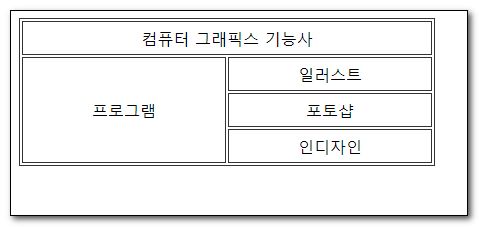
    <table>
        <tr>
            <td colspan="2">컴퓨터 그래픽스 기능사</td>
        </tr>
        <tr>
            <td rowspan="3">프로그램</td>
            <td>일러스트</td>
        </tr>
        <tr>
            <td>포토샵</td>
        </tr>
        <tr>
            <td>인디자인</td>
        </tr>
    </table>
</body>
</html>
5. 표접근성
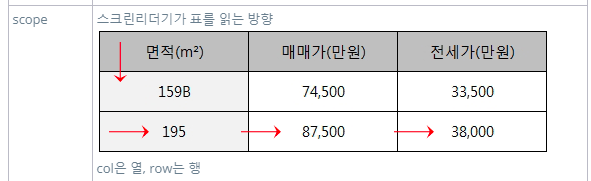
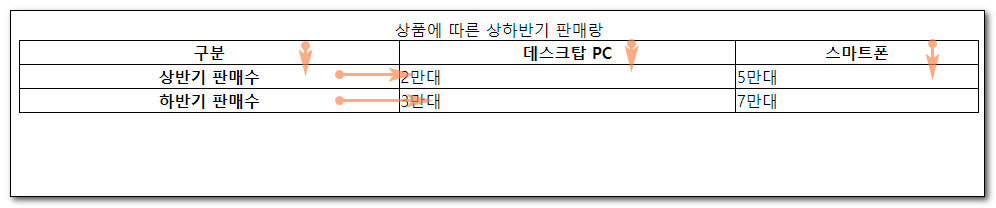
Info: 👁️🗨️ 스크린리더기에게 표의 방향을 알려줌
| 속성 | 설명 |
|---|---|
| caption | 표의 제목을 의미 |
| scope | 스크린리더기 에게 데이터의 방향을 알려줌 |
ex1-23.html
<!DOCTYPE html>
<html lang="ko">
<head>
    <meta charset="UTF-8">
    <title>caption태그와 scope 속성</title>
    <style>
        table{
            width: 100%;
            border-collapse: collapse;
        }
        td,th{
            border: 1px solid #000;
        }
    </style>
</head>
<body>
    <table>
        <caption>상품에 따른 상하반기 판매랑</caption>
        <colgroup>
            <col>
            <col>
            <col>
        </colgroup>
        <thead>
            <tr>
                <th scope="col">구분</th>
                <th scope="col">데스크탑 PC</th>
                <th scope="col">스마트폰</th>
            </tr>
        </thead>
        <tbody>
            <tr>
                <th scope="row">상반기 판매수</th>
                <td>2만대</td>
                <td>5만대</td>
            </tr>
            <tr>
                <th scope="row">하반기 판매수</th>
                <td>3만대</td>
                <td>7만대</td>
            </tr>
        </tbody>
    </table>
</body>
</html>