1. 자바스크립트-필수지식
목차
1. 템플릿문자열 (Template literals)

JavaScript에서 문자열을 작성할 때 더 유연하고 편리하게 사용하기 위한 문법
const name = "망고";
const template = `10+20,${name}`;
console.log(template);

2. 함수
자바스크립트의 함수는 3가지 방식 선언식,표현식,람다식 으로 작성할수 있다.
2-1-선언식
function fn(){}
fn();
2-2-표현식
2-2-1-기명함수
//1
const fnPointer = function fn() {
  console.log('fnPointer');
};
fnPointer();

//2
const fnPointer = function fn(arg) {
  console.log(arg);
};
fnPointer('fnPointer');
2-2-2-익명함수
const fnPointer = function (arg) {
  console.log(arg);
};
fnPointer('fnPointer');
2-3-람다함수(화살표함수)
//1
const fnPointer = (arg)=> {
  console.log(arg);
};
fnPointer('fnPointer');

//2
const fnPointer = (arg)=> console.log(arg);
fnPointer('fnPointer');
3. 비구조화할당(Destructuring)
배열이나 객체의 값을 쉽게 꺼내어 사용할수 있는 문법
3-1-배열
const likeFoods = ["apple", "banana", "orange"];
const food1 = likeFoods[0];
const food2 = likeFoods[1];
const food3 = likeFoods[2];
console.log(food1, food2, food3);
//비구조화 할당
const [f1, f2, f3] = likeFoods;
console.log(f1, f2, f3);
const [food, ...f] = likeFoods;
console.log("🚗",food, f);
3-2-객체
const userObj = {
  uname: "빨라",
  age: 20,
};
//const uname = userObj.uname;
//const age = userObj.age;
console.log(userObj.uname, userObj.age);
//비구조화할당
const { uname, age } = userObj;
console.log(uname, age);

//매핑연산자
const { uname: n, age: a } = userObj;
console.log(n, a);

//어려운객체
const user = ({
  mname = "망고", //기본값 할당
  age1 = 5,
  id,
  money,
  address: { city: cityName, street: streetName },
  contact: { email: emailName, phone: phoneName },
} = {
  id: "man",
  money: 20,
  address: { city: "서울", street: "강남대로" },
  contact: { email: "badman@gmail.com", phone: "010-222-6544" },
});
console.log(id, money, cityName, streetName, emailName, phoneName);

function printuser({ id, money, cityName, streetName }) {
  console.log(id, money, cityName, streetName);
}

printuser(user);
4. 나머지구문(Spread syntax)
전개연산자라고도 불리우는 … 문법은 반복이 가능한 객체를 하나씩 펼쳐서 전개해주는 문법
앝은복사, 깊은복사 알아보기
//spred
//...
const x = [1, 2, 3];
const a = [...x];//얕은복사
const b = x;//값참조

a[0] = 100;
console.log(x === a, a, x);

b[0] = 500;
console.log(x === b, b, x);


// 배열병합
const merge = [...x, ...a];
console.log(merge);

// 객체병합
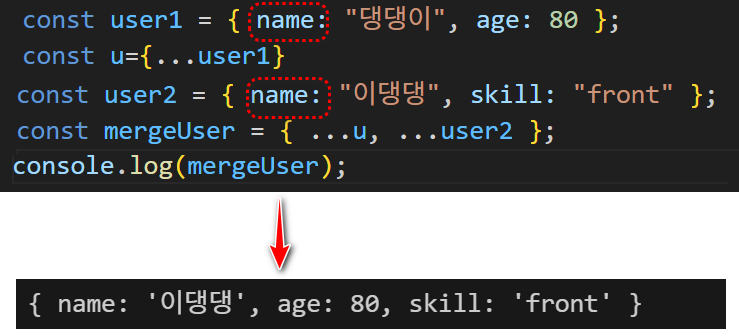
const user1 = { name: "댕댕이", age: 80 };
const u={...user1}
console.log(u === user1);//얕은복사
console.log(u['name'] === user1['name']);//알맹이는 같다

const user2 = { name: "이댕댕", skill: "front" };

const mergeUser = { ...u, ...user2 };
console.log(mergeUser);  //name키의 데이터 변경됨[그림참조]
// spread 연산자는 인수의 갯수가 가변적인 함수에도 사용할수 있다.
function spread(...args) {
  console.log(`args:${args}`);
}
spread(10,3,4)
spread(10,)
- Spread Operator 와 Reduce 함수를 사용한 누산기
function spread(...args) {
  //console.log(`args:${args}`);
  return args.reduce((a, b) => a + b);
}

const acc = spread(19, 30, 5);
console.log(acc);
5. 객체
//변수명 변경하여 구조분해할당
{const user = {
  name: '망고',
  age: 5,
};

const {name: userName, age: userAge} = user;

console.log(userName); // '망고'
console.log(userAge); // 5}

//중첩객체 구조분해할당
{
  const userList = {
    id: 'idid',
    age: 20,
    address: {city: '서울', street: '강남'},
  };
  const {
    id,
    age,
    address: {city, street},
  } = userList;
  console.log(id, age, city, street);
}
//중첩객체의 변수명을 바꿔서 구조분해할당

{
  const {
    id: user_id,
    age: user_age,
    address: {city: user_city, street: user_street},
  } = userList;

  console.log(user_id, user_city);
}
// 객체의 초기값 할당
{
  const userObj = {name: 'abc'};
  const {name, age = 20} = userObj;
  console.log(name, age);
}