
📢 프로그래밍에서 모듈 이란
- export,default
✏️module.html
<!DOCTYPE html>
<html lang="ko">

<head>
  <meta charset="UTF-8">
  <meta http-equiv="X-UA-Compatible" content="IE=edge">
  <meta name="viewport" content="width=device-width, initial-scale=1.0">
  <title>Document</title>
</head>

<body>
  <h1>modules</h1>
  <button>say</button>
  <script>
    document.querySelector('button').addEventListener('click', () => { say("망고") })
    function say(user) {
      alert(`'hello',${user}`)
    }
  </script>
</body>

</html>
일반 html 문서작성후 모듈화 한다
✏️say.js
/*export 를 변수나 함수 앞에 붙이면 외부 모듈에서 해당 변수나 함수에 접근가능*/
export function say(user){
  alert(`Hello,${user}!`)
}
✏️module.html
...
<body>

  <script type="module">
    /* import 를 사용해 say.js의 함수 say를 사용 */

    import {say} from './say.js';
	   document.querySelector('button').addEventListener('click', () => { say("망고") })

	</script>
</body>
</html>
실행화면
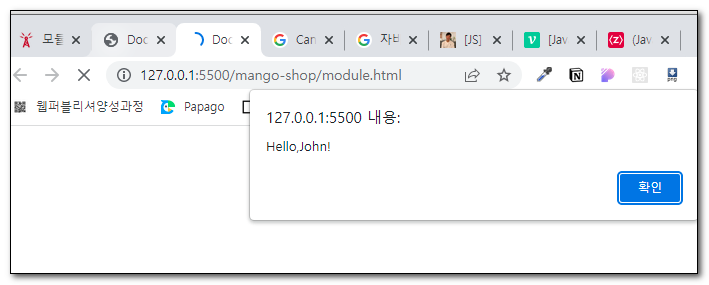
📢 주의사항 :
- 모듈은 로컬 파일에서 동작하지 않고, HTTP 또는 HTTPS 프로토콜을 통해서만 동작합니다.
- 모듈은 자신만의 스코프가 있습니다. 따라서 모듈 내부에서 정의한 변수나 함수는 다른 스크립트에서 접근할 수 없습니다. 브라우저 환경에서도
<script type="module">
을 사용해 모듈을 만들면 독립적인 스코프가 만들어집니다. - 동일한 모듈이 여러 곳에서 사용되더라도 모듈은 최초 호출 시 단 한 번만 실행됩니다. 실행 후 결과는 이 모듈을 가져가려는 모든 모듈에 내보내 집니다.
[여러 객체 export & import 하기]
✏️main.js
function funcA() {
	console.log("functionAA");
}
function funcB(test) {
	console.log(test, "functionbb");
}
const varC = "hello";
export { funcA, funcB, varC };
import 할 때는 {} 를 이용합니다.
✏️module.html
<script type="module">
  import {funcA,funcB,varC} from './main.js';
  funcA()
  funcB(varC)
</script>
실행화면
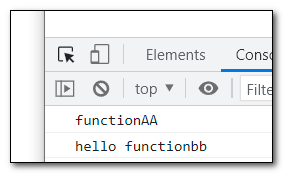
default export와 named export 차이점
1. Default Export
- default 로 선언된 모듈은 하나의 파일에서 단 하나의 변수 또는 클래스 등만 export 할 수 있다.
//app.js
const app= () => {
     ...
}export default app
- import 할 때는 아무 이름으로나 import 가능하다.
//app-child1.js
import ypp from '../app'
또는
//app-child2.js
import bpp from '../app'
이렇게 사용하는것이 가능
2. named export
- 한 파일 내에서 여러 변수/클래스 등등을 export 하는 것이 가능하다.
export class MyFirstClass { /* ... */ }
export class MySecondClass { /* ... */ }
- 다만, import 시 {} 안에다가 export 된 이름과 동일하게 설정해야 한다.
import { MyFirstClass, MySecondClass } from './MyClass'
- 다른 이름으로 import 할 수 있으나 아래처럼
as를 사용해야 한다.
import { MyFirstClass as BlahBlahClass, MySecondClass } from './MyClass'
as를 사용하면 한 파일에 있는 클래스/변수들을 한 번에 import 할 수 있다.
import * as Hello from './MyClass'
// 이렇게 import 하면 Hello.MyFirstClass 이런식으로 사용해야 함