🐨CoalaCoding
DocsExamplesTry itBoardB반
🐨CoalaCoding

개발자를 위한 한국어 웹 기술 문서

문서

  • JavaScript
  • Web Publishing
  • React
  • Python

커뮤니티

  • 게시판
  • 예제 모음
  • Try it 에디터

기타

  • GitHub
  • 관리자
© 2026 CoalaCoding. All rights reserved.
  • 01_변수
  • 02_mask
  • 03_기본문법과-선택자
  • 04_네스팅
  • 05_svg
  • 06_가로스크롤
  • 07_문자
  • 08_반응형-폰트크기
  • 09_문단
  • 10_리퀴드글래스
  • 11_배경
  • 12_세로정렬
  • 13_박스모델
  • 14_레이아웃
  • 15_트랜지션과-애니메이션
  • 10_svg
  • 11_폼디자인
  • 12_clamp(),min(),max()
  • 14_calc
  • 15_animation
  • 16_transition
  • 1_선택자
  • 2_hover효과
  • 3_var
  • 4_클립패스
  • 5_마스크
  • 6_containerQuery
  • 7_retina
  • 8_반응형 햄버거메뉴
  • 9_transform
  • 05_ 반응형 디자인과 접근성
  1. 홈
  2. 문서
  3. HTML & CSS
  4. CSS
  5. 02_mask

02_mask

코드 블록의 Try it Yourself 버튼으로 직접 실행할 수 있다.

구문

MDN 링크

1-Mask

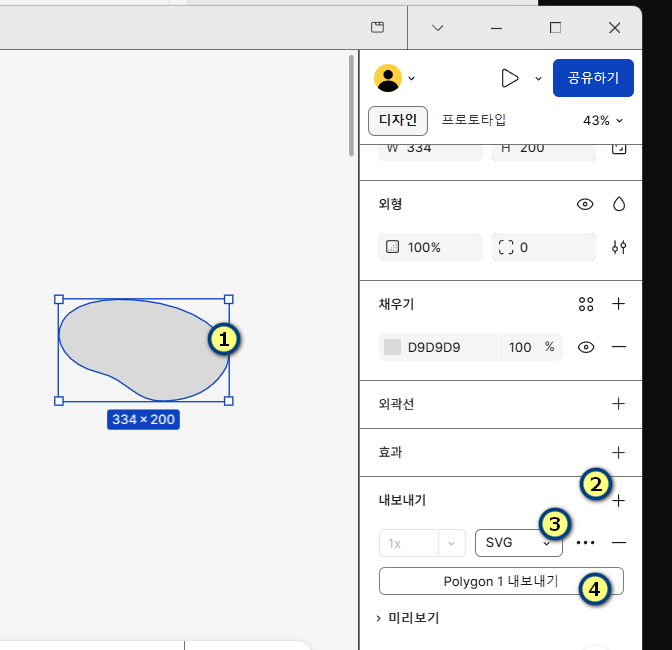
  1. 이미지 다운로드2
  2. 실행화면

1-1-이미지에 적용하기

html

<div class="flex">
  <figure class="item">
    <a href="#">
      <img src="http://qwerew.cafe24.com/images/1.jpg" alt="" />
      <figcaption>
        Lorem ipsum dolor sit amet consectetur adipisicing elit. Quae debitis
        minima veniam vel mollitia reprehenderit velit explicabo impedit
        officiis iusto, in ducimus eius esse! Quia aliquid harum dicta id natus.
      </figcaption>
    </a>
  </figure>
  <figure class="item">
    <a href="#">
      <img src="http://qwerew.cafe24.com/images/1.jpg" alt="" />
      <figcaption>
        Lorem ipsum dolor sit amet consectetur adipisicing elit. Quae debitis
        minima veniam vel mollitia reprehenderit velit explicabo impedit
        officiis iusto, in ducimus eius esse! Quia aliquid harum dicta id natus.
      </figcaption>
    </a>
  </figure>
  <figure class="item">
    <a href="#">
      <img src="http://qwerew.cafe24.com/images/1.jpg" alt="" />
      <figcaption>
        Lorem ipsum dolor sit amet consectetur adipisicing elit. Quae debitis
        minima veniam vel mollitia reprehenderit velit explicabo impedit
        officiis iusto, in ducimus eius esse! Quia aliquid harum dicta id natus.
      </figcaption>
    </a>
  </figure>
</div>
<div class="video_box">
  <video src="./images/video.mp4" autoplay muted loop></video>
</div>

css

body {
      background: gray;
    }

    .flex {
      display: flex;
      width: 80%;
      margin:10rem auto;
      column-gap: 5%;
    }

    .item {
      position: relative;
      width: 30%;
      height: 495px;
      background: transparent;
      box-sizing: border-box;
      padding: 30px;
      cursor: pointer;
      transition: all 0.4s ease;
    }

    .item:hover:before {
      background: rgba(0, 0, 0, 1);
    }

    .item:before {
      content: "";
      position: absolute;
      top: 0;
      left: 0;
      width: 100%;
      height: 100%;
      mask-image: url('./images/card.svg');
      mask-repeat: no-repeat;
      mask-size: 100%;
      background: rgba(255, 255, 255, 1);
      transition: all 0.4s ease;
    }

    .item:after {
      position: absolute;
      content: '';
      background: rgba(0, 0, 0, 0.15);
      height: 100%;
      width: 1px;
      right: -30px;
      top: 0;
    }

    img,
    figcaption {
      position: relative;
      width: 100%;
      top: 0;
    }

1-2-비디오에 적용하기

html

  <div class="video_box">
    <video src="./images/video.mp4" autoplay muted loop></video>
  </div>

css

    .video_box {
      position: relative;
      padding-bottom: 56.85%;
      height: 0;
      overflow: hidden;
    }

    video {
      position: absolute;
      width: 100%;
      height: 100%;
      mask: url('./images/card.svg') no-repeat 50px 0, url('./images/card.svg') no-repeat 550px 300px;
      mask-size: 260px, 150px;
    }

목차

  • 구문